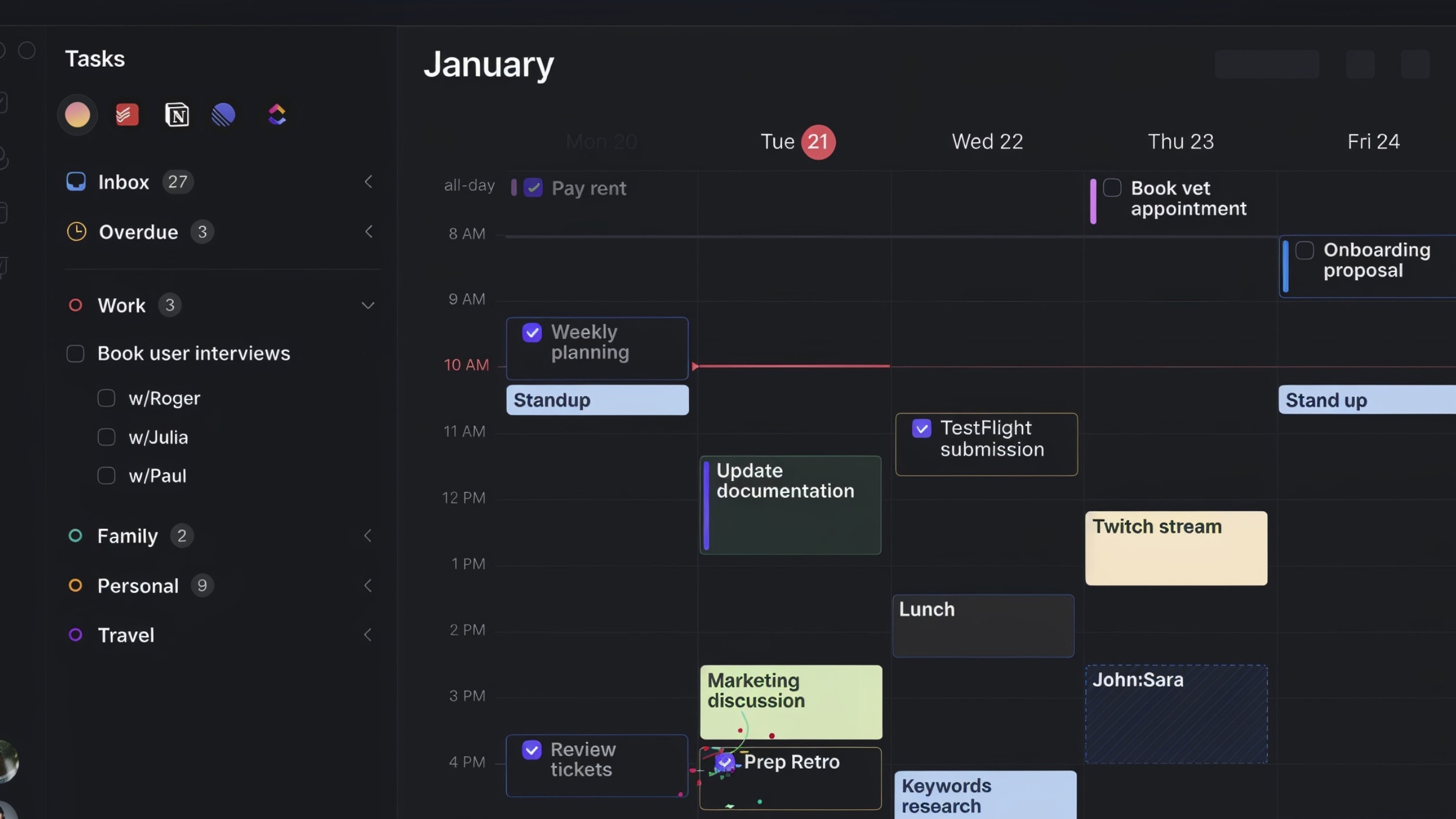

Morgen is a comprehensive productivity tool that integrates calendars, task management, time blocking, and scheduling within a single platform. It is designed for professionals and individuals who want to streamline their workflow, manage their time effectively, and consolidate various productivity functions into one application.
Main Features
- Unified Calendar: Connect and view all your calendars (Google, Outlook, etc.) in one centralised place to avoid scheduling conflicts.
- Task Management: Create, manage, and prioritise tasks directly within the application, keeping your to-do list alongside your schedule.
- Time Blocking: Drag and drop tasks from your list directly onto your calendar to allocate specific time slots for focused work.
- Scheduling Links: Generate and share personalised links to let others book meetings with you based on your real-time availability, eliminating back-and-forth emails.
- Meeting Workflow Tools: Prepare for meetings with integrated notes, manage attendees, and quickly join calls from the calendar event.
- Cross-Platform Sync: Access and manage your schedule and tasks seamlessly across desktop (Windows, Mac, Linux) and mobile (iOS, Android) devices.
- Integrations: Connects with various calendar services and productivity tools to create a cohesive workflow.
Pricing
Morgen offers three different pricing packages to suit various needs:
Basic
$0
per month
For individuals getting started with unified calendars and basic task management.
- 1 Calendar Account
- 1 Scheduling Link
- Basic Task Management
- Cross-platform access
Personal
$9
per month billed monthly
For individuals looking to fully optimise their time and productivity with advanced features.
- Unlimited Calendar Accounts
- Unlimited Scheduling Links
- Recurring Tasks
- Calendar Sync
Pro
$14
per month billed monthly
For professionals and teams requiring advanced scheduling and collaboration tools.
- All Personal Features
- Team Scheduling Pages
- Personalised Branding
- Priority Support
Breakdown of Features within the Pricing Structure
Basic Plan
- 1 connected calendar account
- 1 active scheduling link
- Basic task management features
- Access on all desktop and mobile platforms
Personal Plan
- All features from the Basic plan
- Unlimited connected calendar accounts
- Unlimited active scheduling links
- Recurring tasks and events
- Integration with productivity apps
Pro Plan
- All features from the Personal plan
- Team-based scheduling pages
- Remove Morgen branding from scheduling links
- Add custom branding and colours
- Priority customer support
Pros
- All-in-One Hub: Combines calendars, tasks, and scheduling, reducing the need to switch between multiple apps.
- Cross-Platform Support: Available on all major desktop and mobile operating systems, ensuring your schedule is always in sync.
- Powerful Scheduling: The scheduling links feature is robust, offering customisation and simplifying the process of booking meetings.
- Intuitive Interface: Features a clean and user-friendly design that makes time blocking and task management straightforward.
- Seamless Integration: Connects with popular calendar services like Google Calendar and Outlook 365.
Cons
- Limited Free Version: The Basic free plan is quite restrictive, particularly with the one-calendar-account limit.
- Mobile App Limitations: The mobile app may not have the full range of features available on the desktop version.
- Learning Curve: For users new to integrated productivity systems, the number of features might initially seem overwhelming.
- Advanced Features Paywalled: Key professional features like custom branding and team scheduling are only in the most expensive tier.
- No Web Version: Requires a desktop application download; there is no fully-featured web-based version.
Mental Health
Morgen serves as an effective tool for improving mental well-being by bringing order and clarity to your daily schedule. By consolidating all commitments and tasks into a single view, it helps reduce the mental load and anxiety that come from a disorganised routine. The practice of time blocking allows you to dedicate focus time, preventing burnout and promoting a healthier work-life balance. Achieving a sense of control over your time and seeing tangible progress on your to-do list can boost confidence and reduce stress, making Morgen a valuable ally in maintaining a balanced and productive life.
Summary
Morgen is a powerful and versatile productivity tool that excels at merging calendar management with task organisation. Its tiered pricing makes it accessible for different types of users, from individuals just starting to organise their time to professionals and teams needing advanced collaboration features. With its strong emphasis on time blocking and streamlined scheduling, Morgen is an excellent choice for anyone looking to enhance their personal productivity, manage their time more intentionally, and achieve a greater sense of control over their daily activities.