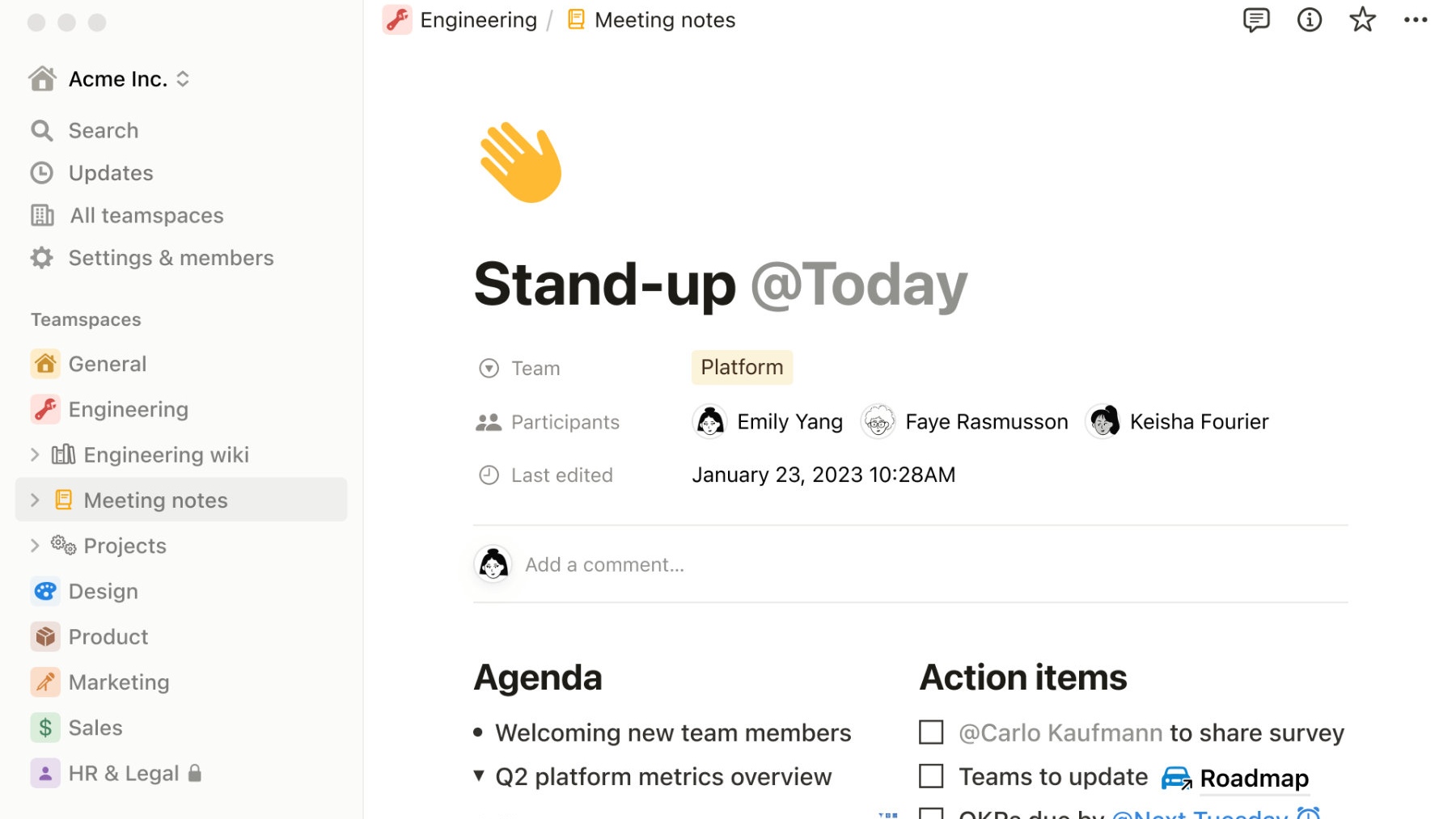
Notion is a productivity tool designed to enhance efficiency and provide a unified workspace. Perfect for students, professionals, or anyone seeking to streamline their work processes, Notion offers a variety of features tailored to meet individual needs.
Main Features
- Workspace Management: Facilitates the creation and organization of workspaces for different projects.
- Notes & Docs: Offers a space for taking notes and creating documents.
- Knowledge Base: Allows users to create a database for easy information management.
- Tasks & Projects: Promotes collaboration by sharing tasks and projects with others.
- Spreadsheets & Databases: Helps in organizing data by enabling spreadsheet and database setup.
- Team Collaboration: Creates a space for team members to collaborate and communicate.
- Cross-Platform Sync: Keeps your workspace updated across various devices, both mobile and desktop.
Pricing
Notion offers three different pricing packages:
Free
$0
per month
provides all the basic workspace management functionality at no cost.
- Unlimited pages and blocks
- Share with 5 guests
- Sync across devices
- Basic workspace management features
Personal Pro
$12
per month
or $120 per year
unlocks advanced features such as unlimited file uploads, priority support, and version history.
- Unlimited guests
- Unlimited file uploads
- Priority support
- Version history
Team
$18
per user per month
or $180 per year
introduces administrative features like team billing and priority support.
- Unlimited team members
- Advanced permissions
- Admin tools
- All Personal Pro features
Breakdown of Features within the Pricing Structure
Free Plan
- Unlimited pages and blocks
- Share with 5 guests
- Sync across devices
- Basic workspace management features
Personal Pro Plan
- Unlimited guests
- Unlimited file uploads
- Priority support
- Version history
Team Plan
- Unlimited team members
- Advanced permissions
- Admin tools
- All Personal Pro features including team billing and priority support
Pros
- User Friendly: Notion provides an intuitive and clean interface, making it easy to navigate and manage workspaces.
- Multiple Platform Support: Whether using iOS, Android, Windows, Mac, or a browser-extension, Notion works seamlessly across devices.
- Workspace Organization: Page and block features assist in the effective categorization of workspaces, ensuring no project is overlooked.
- Collaboration Tools: Assign, share tasks, and collaborate with peers for increased work efficiency.
- Flexible Data Management: Tailored spreadsheets and databases ensure organized data management.
Cons
- Limited Free Version: While a free version is available, access to key features is locked behind the premium paywall.
- No Inbuilt Chat Feature: Unlike some competitors, Notion does not include an inbuilt chat feature.
- Advanced Features in Premium: Features like unlimited file uploads, priority support, and version history are only available in the premium version.
- Limited Guests in Free Plan: The free plan allows only five guests.
- No Offline Mode: The app does not support offline mode.
Mental Health
Notion provides an effective tool for maintaining mental health by inducing control and order in work processes. By organising workspaces, setting priorities and scheduling your day, it helps to reduce stress and anxiety. Notion also offers an element of satisfaction from task completion, boosting mood and self-confidence. Thus, Notion is not only a productivity tool, but also a means to promote mental wellbeing and a balanced, stress-free lifestyle.
Summary
Notion is a comprehensive tool with features that cater to individuals and businesses alike. Its tiered pricing structure broadens its reach, ensuring users can access necessary features within their budget. Notion is an essential tool in managing both professional and personal tasks efficiently, enhancing productivity and mental wellbeing.
Hello, fellow digital explorers! As someone deeply invested in how technology can support our mental well-being, I'm constantly on the hunt for tools that bring a sense of order to the beautiful chaos of our minds. For years, I've heard whispers and shouts about an app that promised to be an "all-in-one workspace." A place for notes, tasks, wikis, and databases. That app is Notion, and after spending countless hours building, organising, and living within its digital walls, I’m ready to share my journey. Is it the holy grail of productivity and mental clarity it claims to be? Well, it’s complicated, but in the most wonderful way.
First Impressions: More Than Just a Blank Page
Opening Notion for the first time is a unique experience. Unlike most note-taking apps that present you with a simple, linear document, Notion gives you a clean, open canvas. It feels less like a digital notebook and more like a personal workshop, complete with a set of powerful tools waiting to be used. The initial tour introduces you to the fundamental concept of "blocks." Everything in Notion is a block: a piece of text, an image, a checklist item, a heading, even an entire database.
This block-based system is the source of Notion's incredible flexibility. You can drag and drop blocks, arrange them into columns, and transform one type of block into another with a simple command. At first, this sheer potential can feel a little intimidating. The minimalist interface, while beautiful, doesn't hold your hand in the same way other apps do. It invites you to build, to create your own systems from the ground up. For someone used to rigid structures, this can be a bit of a learning curve, but for those of us who crave customisation, it’s a breath of fresh air.
The Powerhouse Feature: Databases
If I had to choose one feature that completely sold me on Notion, it would be its databases. Now, don't let the word "database" scare you off. We're not talking about complex, code-heavy spreadsheets. In Notion, a database is essentially a super-powered collection of pages, where each page is an item in your collection. This is where Notion transformed from a "cool app" into an indispensable part of my life.
My passion for reading is a perfect example. For years, I tried to keep track of the books I've read, want to read, and am currently reading. I used simple lists in other note apps, spreadsheets, and even physical journals. Nothing ever stuck. The information was flat and disconnected.
With Notion, I created a database I call "My Digital Library." Each entry in this database is a new page for a specific book. The magic comes from the "properties" I can add to each entry. I have properties for:
- Author: So I can easily group all books by the same writer.
- Genre: A multi-select tag for everything from Sci-Fi to Psychology.
- Status: A dropdown menu with options like "To Read," "Currently Reading," and "Finished."
- Rating: A simple star rating from one to five.
- Publication Year: To see when a book was written.
- My Summary: A text field where I can jot down my personal thoughts and key takeaways after finishing.
This isn't just a list anymore; it's a dynamic, interconnected system. The real game-changer is the ability to create different "views" of the same database. I have a simple table view that looks like a clean spreadsheet. I have a "Gallery" view that shows the book covers for a more visual browsing experience. My favourite is a "Board" view, organised by my "Status" property. This gives me a Kanban-style board with columns for "To Read," "Currently Reading," and "Finished." It's incredibly satisfying to drag a book's card from one column to the next.
This level of organisation, where I can sort by author, filter by genre, and visualise my reading journey, is something a standard note-taking app simply cannot do. It has completely revolutionised how I engage with my hobby, turning a simple list into a rich, personal encyclopaedia of my reading life.
Building Your Own Digital World: Templates and Customisation
While starting with a blank page is liberating, it can also be daunting. Thankfully, Notion has a vast and ever-growing library of templates. Whether you want a weekly agenda, a content calendar, a simple to-do list, or a complex project management dashboard, there's likely a template to get you started.
I found these templates to be fantastic launching pads. I’d often start with a pre-built template, like a habit tracker, and then begin to tweak it to perfectly suit my needs. I’d add properties that were meaningful to me, change the layout, and integrate it into my main "Life Dashboard."
This "Life Dashboard" has become the home screen for my entire life. It’s a single page that I’ve customised with links to all my key areas: my book library, my work projects, my weekly meal plan, my journal, and my goals. It has a calendar view of upcoming appointments and a linked view of tasks that are due today. Having everything in one central, organised hub has done wonders for reducing that feeling of being overwhelmed by a dozen different apps and lists scattered across my digital life.
The Sticking Point: When Simplicity is Better
As much as I adore Notion for its structure and power, I have to be honest about where it falls short for me. I tried, I really did, to make it my one and only app for everything. I wanted it to be the place for every single thought that popped into my head. A quick phone number to remember? A grocery item to add to the list? A fleeting idea for a blog post? I tried to capture them all in Notion.
And it was just too much friction.
The process of capturing a quick, transient thought felt cumbersome. It involved opening the app, deciding which page or database this little snippet of information belonged to, creating a new page or entry, and then typing it in. Compared to a dedicated quick-capture app that opens instantly to a blank line, it felt like using a sledgehammer to crack a nut. The very structure that makes Notion so powerful for complex information becomes a barrier when speed and simplicity are the priority.
So, I came to a peaceful conclusion: Notion is not my "everything" app, and that's okay. It is my "second brain," my personal wiki, my project command centre. For those quick, in-the-moment thoughts, I still rely on a much simpler, faster tool. Recognising this distinction was key to truly appreciating what Notion does best.
Notion and My Mental Health: Creating Order from Chaos
As a writer on a mental health blog, the most important question for me is: how does this tool actually support my well-being? For me, Notion has been profoundly helpful in externalising my thoughts and creating a sense of control, which is a powerful antidote to anxiety.
I've built a dedicated journaling practice within Notion. I have a database where each entry is a day. I created a template for new entries that automatically populates with prompts like, "What's one thing I'm grateful for today?", "What's a challenge I faced and how did I handle it?", and "How am I feeling physically and emotionally?". Being able to look back at my entries in a calendar view helps me identify patterns in my moods and habits over time.
Speaking of habits, my habit tracker has been a game-changer. It's a simple database with checkboxes for daily habits I want to cultivate, like meditation, exercise, and staying hydrated. The simple, tangible act of checking off those boxes provides a small dopamine hit and a visual representation of the promises I'm keeping to myself.
Perhaps most importantly, Notion helps me break down big, overwhelming life projects into small, manageable steps. Whether it's planning a trip or tackling a home organisation project, I can use a Notion board to map out every single task. Moving a task card from "To Do" to "In Progress" and finally to "Done" provides a powerful sense of accomplishment and momentum. It takes the swirling chaos of "all the things I have to do" out of my head and lays it out in a clear, actionable path forward. This process of decluttering my mind has been invaluable.
Conclusion: Will I Keep Using Notion?
So, after this deep dive, will Notion remain a part of my digital toolkit? The answer is an emphatic and resounding yes.
Notion has fundamentally changed the way I organise complex information and manage my personal projects. For anything that requires structure, relationships, and multiple ways of viewing the same data, like my book library, my content ideas, or my long-term goals: it is simply unmatched. It has successfully become the "second brain" I always wanted, a reliable and endlessly customisable space to think and plan.
However, it has not replaced my need for a simple, fast app for capturing fleeting thoughts. By accepting its role as a powerful organiser rather than an all-encompassing capture tool, I've found the perfect balance. It works in harmony with my other tools, each playing to its strengths.
If you're someone who feels overwhelmed by scattered notes and lists, and you crave a single place to build structured, interconnected systems for your life and hobbies, I cannot recommend Notion enough. Be prepared for a small learning curve, but the reward (a sense of clarity, control, and beautifully organised information) is more than worth the effort. It’s not just an app; it’s a space to build a more intentional and organised life.